
Most office Wi-Fi problems are not caused by the internet connection itself, but by an internal network that wasn't designed for the real number of users and the real space. These guidelines make a network more stable and easier to manage.
1. Survey the site before choosing equipment
Concrete walls, glass, steel cabinets and the number of floors all affect the signal. A site survey shows how many access points are needed and where they should go, based on the number of users and devices in each zone, not just the floor area.
2. Use several access points wired back to a switch
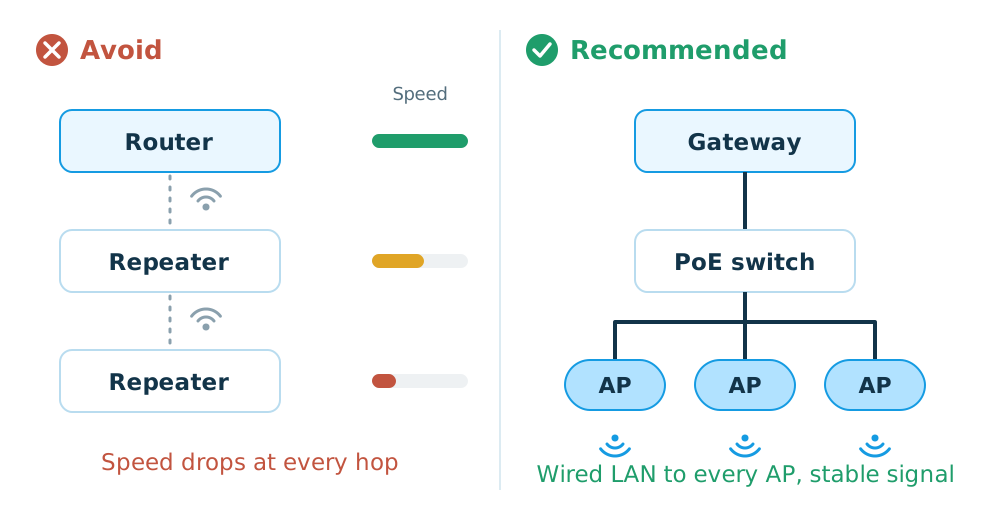
A single router, or wireless repeaters, usually means lower speeds and frequent drop-outs. Several access points connected by LAN cable and powered over the same cable (PoE) give a much more stable signal. Choose a system that manages all access points centrally, so devices hand over smoothly as people move around the office.
3. Separate networks by user group
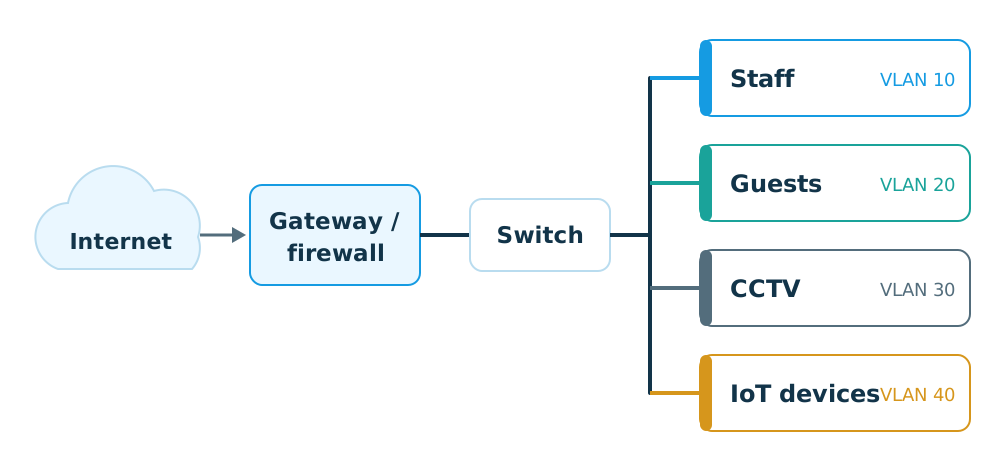
Create separate networks (VLANs) for at least staff, guests, CCTV and IoT devices. This improves both security and performance: guests cannot reach company computers, and cameras that stream all day don't take bandwidth away from staff.
4. Set up the radio bands properly
- Use the 5 GHz or 6 GHz band for devices that support it. These bands have more channels and less interference than 2.4 GHz.
- Choose channels that don't overlap with nearby access points.
- Adjust transmit power to the space. If it is too strong, devices may stay connected to a distant access point instead of a closer one.
5. Get internal names and settings right
Small details matter. Setting the network's local domain to the same name as the company website can stop office computers from opening the company's own site, because the network equipment answers that name itself instead of passing the request to the internet. Leave it blank, or use a name that doesn't exist on the internet.
6. Keep maintaining it after installation
Update network firmware regularly, put the core equipment on a UPS, and monitor the network from its management system, so problems are found before users report them.
Signs it is time to redesign: the router needs frequent restarts, the connection drops when moving between rooms, speeds fall when everyone arrives at work, or several repeaters are chained together.