
Many meeting rooms have a large screen and an expensive camera, yet online meetings still don't run smoothly, because the equipment was chosen before anyone looked closely at the room and how it is used. A good system starts with simple questions: what kind of meetings happen here, how many people attend, and who joins from outside?
1. Start with room size and meeting style
- Small rooms (2–6 people): one screen, a wide-angle camera and an all-in-one bar that combines camera, microphones and speaker. Easy to install and easy to use.
- Medium rooms (6–12 people): usually need separate microphones that cover the whole table, and a camera that can reframe or follow the speaker.
- Large rooms and training rooms: need room-wide audio, several microphone points, and possibly more than one screen or projector.
2. Match screen size to viewing distance
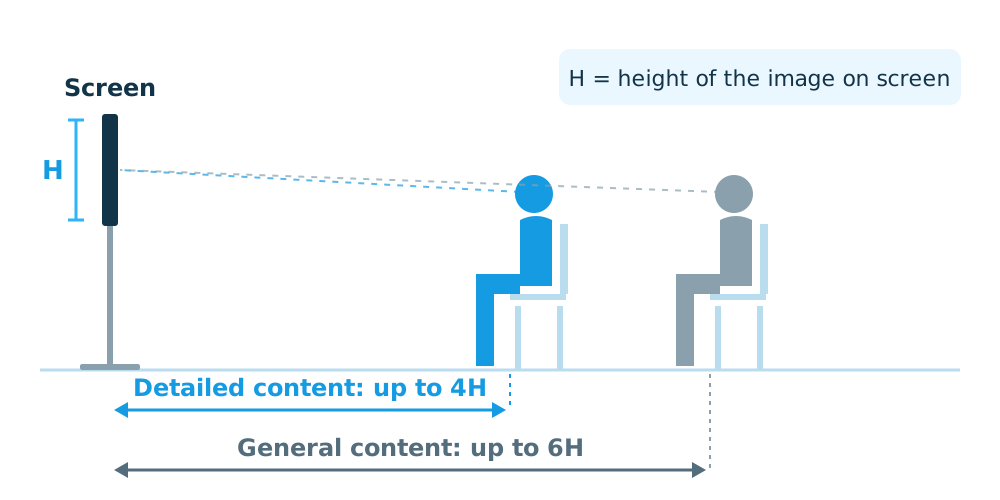
A common rule of thumb looks at the person sitting farthest from the screen. If people need to read documents or detailed figures, that distance should be no more than about 4 times the height of the image on screen; for general content it can stretch to about 6 times. A screen that is too small is unreadable from the back of the room, while one that is too large for a small room is tiring to watch.
3. Audio matters more than video
In online meetings, people tolerate a soft picture far better than audio they cannot understand. Consider:
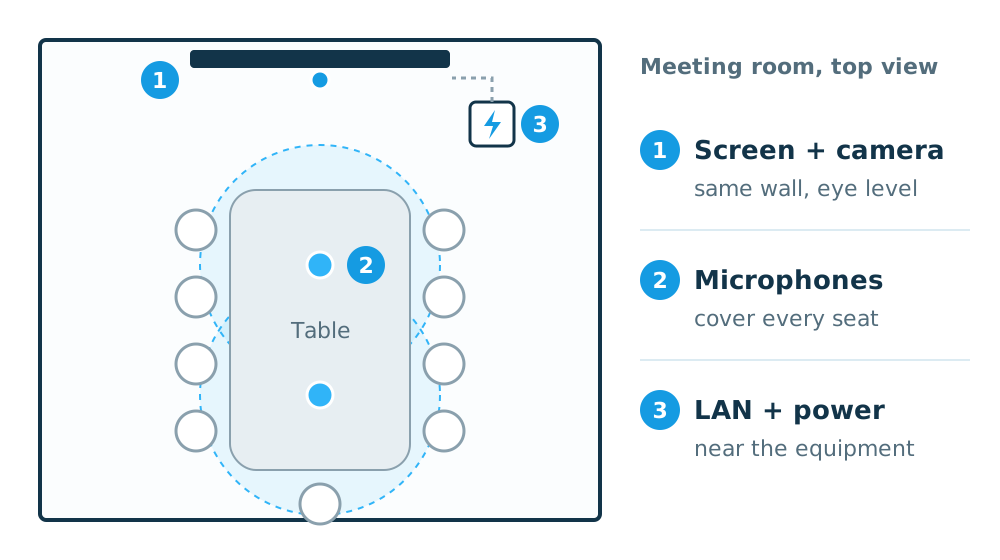
- Microphones that cover every seat, not only the head of the table.
- Acoustic echo cancellation, so remote participants don't hear their own voice coming back.
- The room itself. Glass walls and hard surfaces cause echo, and may need acoustic treatment alongside the equipment.
4. Place the camera so everyone is seen
Mount the camera close to eye level and on the same side as the screen, so that people looking at the screen appear to make eye contact with remote participants. For rooms with several people, a wide-angle or auto-framing camera keeps everyone in the picture.
5. Choose a connection method that suits your organization
There are two main approaches.
- Bring your own device (BYOD): users connect their own laptop by cable or wirelessly and use whichever meeting software they prefer. Flexible and works across platforms.
- Dedicated meeting room systems: systems built for platforms such as Microsoft Teams or Zoom. Meetings start from a touch panel on the table in a few steps. Best for organizations that standardize on one platform.
Whichever you choose, run a wired LAN connection to the room and make sure the network has enough bandwidth when several rooms are in meetings at the same time.
6. Make it easy for everyone
The best system is one every employee can start without calling IT. Keep the start-up steps short, put a quick guide in the room, and train users after installation.
Checklist before choosing equipment: maximum number of seats, distance from the screen to the farthest seat, wall and floor materials, the meeting platform your organization uses, and where power and LAN cabling can run in the room.